Xbox Servers Down Leaves Thousands Unable to Play
Xbox Servers Down has become one of the most searched gaming topics today after thousands of players reported issues signing in, launching digital games, and accessing Xbox Network services. The widespread disruption has left gamers across Xbox Series X, Xbox Series S, Xbox One, and PC unable to verify game licences, triggering the frustrating 0x87E107DF error.
Reports started flooding social media and outage tracking platforms as users complained that purchased games, Xbox Game Pass titles, and online services suddenly stopped working. Since this is a server-side issue, many players initially assumed their consoles or internet connections were faulty. However, the evidence suggests a large-scale Xbox outage affecting users worldwide.
If you’re wondering why your console isn’t working, here’s everything you need to know about Xbox Servers Down, the 0x87E107DF error, and the latest updates.
Why Are Xbox Servers Down Today?
The current Xbox Servers Down incident appears to be linked to Microsoft’s authentication infrastructure.
Whenever a digital game launches, Xbox verifies ownership through Xbox Network. During today’s Xbox outage, this verification process is failing, causing users to lose temporary access to purchased digital games and Game Pass titles.
Players have reported:
- Digital games won't launch
- Xbox Game Pass games fail to verify
- Xbox Store loading issues
- Sign-in failures
- Multiplayer connection problems
- Cloud Gaming interruptions
The large number of reports indicates the Xbox Servers Down issue is affecting multiple regions simultaneously.
The 0x87E107DF error is one of the most common authentication errors displayed when Xbox Network cannot verify ownership of digital content.
Instead of opening your game, Xbox displays the 0x87E107DF error, preventing access until licence verification succeeds.
Fortunately, this doesn’t mean:
- Your account has been suspended.
- Your games have disappeared.
- Your console is damaged.
Instead, the 0x87E107DF error simply indicates Microsoft’s servers cannot complete the authentication process during the current Xbox Servers Down event.
Which Xbox Services Are Affected?
The ongoing Xbox Servers Down issue is affecting several services, including:
- Xbox Live sign-in
- Xbox Store
- Digital licence verification
- Xbox Game Pass
- Multiplayer gaming
- Cloud Gaming
- Friends list synchronisation
Many users report that even offline-installed games cannot launch because licence verification cannot be completed.
How to Fix Xbox Servers Down Issues
Xbox serves down : 0x87E107DF error Fix
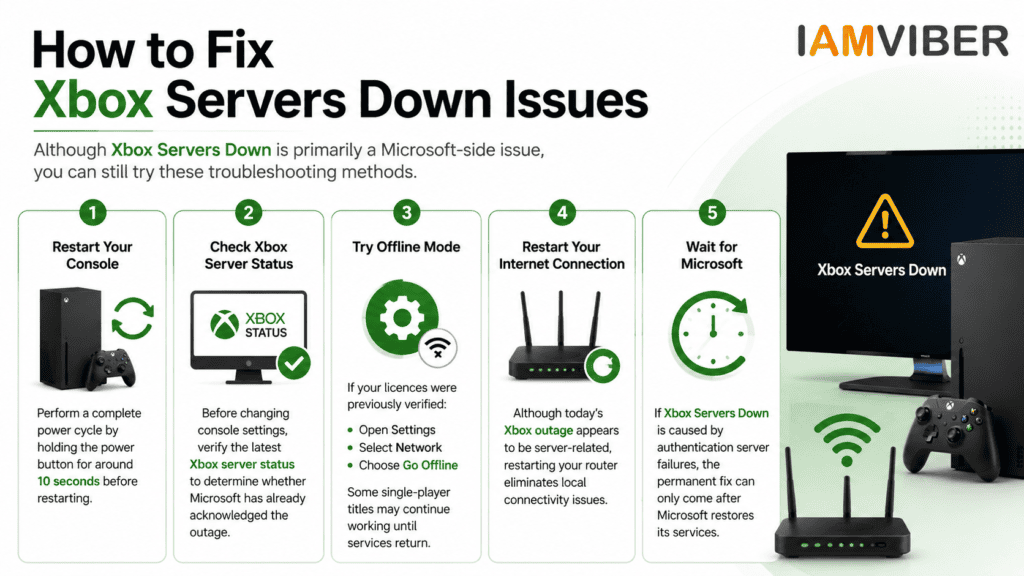
How to Fix Xbox Servers Down Issues
| Issue / Method | What It Means | Best Fix |
|---|---|---|
| Restart Your Console | Temporary system glitches or authentication errors may prevent games from launching during the Xbox Servers Down outage. | Perform a complete power cycle by holding the Xbox power button for about 10 seconds, then restart your console and try again. |
| Check Xbox Server Status | The issue may be caused by Microsoft's servers rather than your Xbox or internet connection. | Visit the official Xbox Server Status page to confirm whether Microsoft has acknowledged the outage before changing any settings. |
| Try Offline Mode | Previously verified digital licences may still allow access to supported offline games. | Go to Settings → Network → Go Offline. Some single-player games may continue working until Xbox services are restored. |
| Restart Your Internet Connection | Local network issues can sometimes cause Xbox sign-in or connectivity problems even during an outage. | Restart your router or modem, reconnect your Xbox to the internet, and try launching your game again. |
| Wait for Microsoft | If the Xbox Servers Down issue is caused by authentication or Xbox Network server failures, only Microsoft can resolve it. | Wait for Microsoft to restore Xbox services. Once the outage is fixed, digital licences and online features should work normally again. |
Although Xbox Servers Down is primarily a Microsoft-side issue, you can still try these troubleshooting methods.
Restart Your Console
Perform a complete power cycle by holding the power button for around 10 seconds before restarting.
Check Xbox Server Status
Before changing console settings, verify the latest Xbox server status to determine whether Microsoft has already acknowledged the outage.
Try Offline Mode
If your licences were previously verified:
- Open Settings
- Select Network
- Choose Go Offline
Some single-player titles may continue working until services return.
Restart Your Internet Connection
Although today’s Xbox outage appears to be server-related, restarting your router eliminates local connectivity issues.
Wait for Microsoft
If Xbox Servers Down is caused by authentication server failures, the permanent fix can only come after Microsoft restores its services.
Is Xbox Live Down Worldwide?
Yes. Reports indicate that Xbox Live down searches have surged as players across North America, Europe, Asia, Australia, and other regions experience similar issues.
Because users from multiple countries are affected simultaneously, experts believe the incident is linked to Microsoft’s central authentication infrastructure rather than local internet providers.
Is Xbox Game Pass Affected?
Yes
Many subscribers cannot access Game Pass titles because Xbox cannot validate active subscriptions during the Xbox Servers Down incident.
This affects:
- Xbox Series X
- Xbox Series S
- Xbox One
- PC Game Pass
- Xbox Cloud Gaming
Latest Xbox Server Status Update
Microsoft has acknowledged disruptions affecting Xbox Network services. While engineers continue investigating the issue, there is currently no official restoration timeline.
Historically, authentication outages similar to Xbox Servers Down have been resolved within several hours, though larger infrastructure incidents may take longer.
Until services recover:
- Digital games may remain inaccessible.
- Game Pass titles may fail to launch.
- Multiplayer features could remain unavailable.
- The 0x87E107DF error may continue appearing.
Today’s Xbox Servers Down incident demonstrates how dependent modern digital gaming has become on online authentication systems. Even fully downloaded games may temporarily stop working when licence verification servers experience outages.
If you’re seeing the 0x87E107DF error, there’s little evidence that your console or account is at fault. Instead, the issue is part of a widespread Xbox outage affecting players worldwide.
The best approach is to monitor the Xbox server status, avoid unnecessary troubleshooting, and wait for Microsoft to restore authentication services. Once the servers return, games should verify automatically and launch as expected.
Frequently Asked Questions (FAQs)
1. Why are Xbox Servers Down today?
A widespread Microsoft authentication issue is preventing users from accessing digital games and Xbox Network services.
2. What does the 0x87E107DF error mean?
It means Xbox cannot verify ownership of your digital content because authentication services are unavailable.
3. Is Xbox Live down worldwide?
Yes. Thousands of reports indicate players across multiple countries are experiencing the same outage.
4. Can I fix Xbox Servers Down myself?
You can restart your console or try offline mode, but if the issue is server-side, you’ll need to wait for Microsoft to restore services.
5. Is Xbox Game Pass affected?
Yes. Many Game Pass subscribers cannot launch games due to licence verification failures.
6. How do I check Xbox server status?
Visit Microsoft’s official Xbox Status page to see whether authentication and gaming services are operational.
7. Will I lose my purchased games?
No. Your games remain linked to your Microsoft account. The outage only affects temporary licence verification.
8. When will Xbox Servers Down be fixed?
Microsoft has not announced an exact restoration time, but similar authentication outages are typically resolved within a few hours.
Topics to follow on IAMVIEBR : Current Affairs & Insights Tech Innovation GenZ entrepreneurship Collaborative Fashion GEO AI Agentic SME