OpenClaw Android and iOS : Official Mobile Apps Launch for AI Agents
OpenClaw Android and iOS marks a major step forward for developers using AI agents on mobile devices.
Artificial intelligence has moved far beyond simple chatbots. Today, AI can write code, analyze data, automate repetitive tasks, and even complete multi-step workflows with minimal human input. The next big evolution isn’t just smarter AI—it’s AI that can work independently while staying connected to you wherever you are.
That’s exactly why the launch of OpenClaw’s official Android and iOS apps is generating attention across the AI community.
Until now, OpenClaw users mainly relied on desktop environments or messaging platforms to interact with their AI agents.
While that worked for developers and early adopters, it wasn’t the most convenient experience. Managing long-running AI workflows from a smartphone wasn’t seamless, especially when you were away from your computer.
With native mobile applications now available for both Android and iPhone, OpenClaw is taking an important step toward making autonomous AI more practical for everyday use.
But this launch isn’t just about having another AI app on your phone. It reflects a much bigger shift happening in artificial intelligence—the transition from AI assistants to AI agents that work continuously in the background.
What Is OpenClaw?
OpenClaw is an open-source AI agent platform designed to automate complex digital tasks. Instead of responding to one prompt at a time like a traditional chatbot, OpenClaw allows users to create AI agents capable of planning, executing, and monitoring multi-step workflows.
Think of it as giving an AI employee a set of instructions instead of asking individual questions. For example, an AI agent could:
- Research a topic across multiple websites
- Summarize reports
- Monitor specific events
- Organize information
- Generate documents
- Execute scheduled workflows
- Notify users when important changes occur
- Because OpenClaw is open source, developers can customize nearly every part of the system. They aren't locked into a single cloud provider or forced into a closed ecosystem.
- That flexibility has made OpenClaw increasingly popular among developers, AI enthusiasts, startups, and organizations experimenting with autonomous workflows.
Why the Mobile Launch Matters
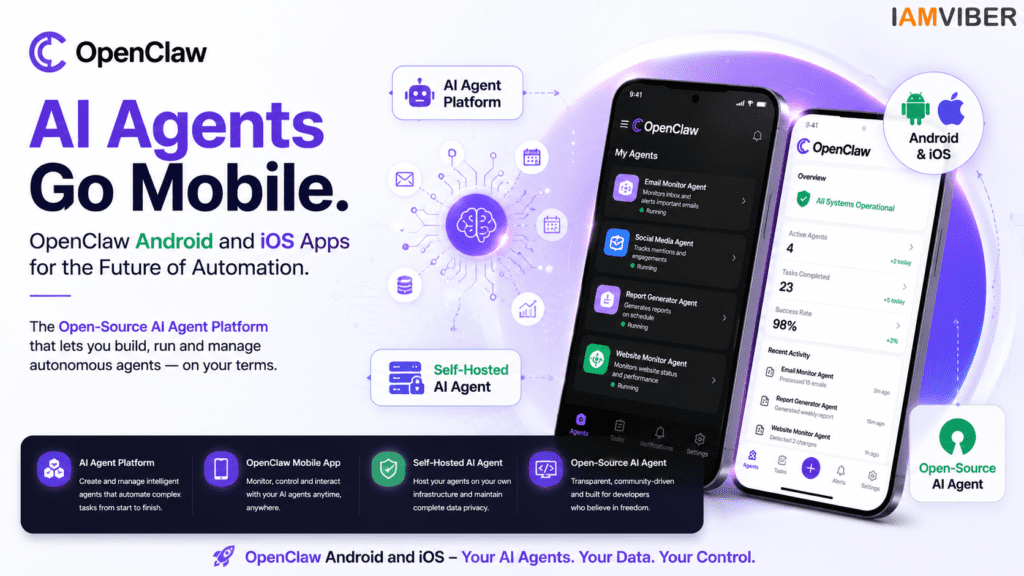
The arrival of OpenClaw Android and iOS makes the platform more accessible for users who prefer managing workflows on mobile devices.
The launch of OpenClaw Android and iOS brings official mobile access to self-hosted AI agents.
Many AI tools today still assume users are sitting in front of a computer. Reality is different. Founders travel. Developers attend meetings. Operations teams work remotely. Businesses run around the clock.
If an AI agent encounters an issue or completes an important workflow, waiting until someone opens a laptop creates unnecessary delays.
The new OpenClaw mobile apps solve this problem by allowing users to stay connected to their AI agents from virtually anywhere.
Instead of constantly checking a desktop dashboard, users can receive updates, review completed tasks, approve workflows, and monitor ongoing processes directly from their smartphones. That makes AI automation significantly more practical in real-world business environments.
More Than Just Another AI Chat App
One of the biggest misconceptions surrounding OpenClaw OpenClaw Android and iOS launch is that it competes directly with apps like ChatGPT or Gemini .
It doesn’t.
Those platforms primarily focus on conversations. OpenClaw focuses on autonomous execution. Rather than simply answering questions, OpenClaw is designed to complete tasks over time. Imagine asking an AI to:
- Monitor competitor pricing every morning
- Watch GitHub repositories for changes
- Track breaking AI news
- Generate weekly reports
- Analyze customer feedback
- Notify your team only when something important happens
- That's where AI agents become much more valuable than traditional chatbots. The mobile app acts as a control center for these autonomous systems instead of replacing them.
What Can Users Do Inside the OpenClaw Android and iOS Mobile App?
The official OpenClaw Android and iOS applications give users a cleaner and more convenient way to interact with their OpenClaw setup. Some of the key capabilities include:
Monitor Active AI Agents
Users can check whether their AI agents are running successfully without needing access to a desktop. Whether an agent is researching information, processing documents, or completing automation tasks, progress can be viewed from the phone.
Receive Instant Notifications
Instead of manually checking workflows, the app sends updates whenever important events occur. This helps users stay informed without constantly monitoring dashboards.
Manage Ongoing Tasks
Long-running AI workflows can be reviewed and managed directly from the mobile interface. This creates a smoother experience for users handling multiple automation projects simultaneously.
Access Conversations Anywhere
If an AI agent needs additional instructions, users can interact with it directly through the app rather than waiting until they’re back at their computer. The result is a much more responsive workflow.
There's One Important Catch
Despite the excitement surrounding the launch, OpenClaw isn’t trying to become another cloud-based AI assistant. The mobile application works alongside an OpenClaw Gateway.
In simple terms, the Gateway acts as the bridge between your phone and your self-hosted AI environment.
That means users still need an OpenClaw instance running on their own computer or server to unlock the platform’s full capabilities.
For developers, this approach offers significant advantages: Sensitive data remains under their control. Organizations maintain greater privacy. Custom integrations remain fully flexible.
Instead of sending everything to a centralized cloud platform, users can decide exactly where and how their AI agents operate.While this setup may require a bit more technical knowledge compared to downloading a typical AI app, it’s one of the reasons OpenClaw has attracted developers who value openness, customization, and control.
Why This Launch Reflects a Bigger AI Trend
OpenClaw Android and iOS reflects the growing demand for mobile-first AI automation.
The arrival of OpenClaw’s mobile apps highlights an important shift in artificial intelligence. Over the past two years, the conversation has largely revolved around AI chatbots.
Today, the focus is rapidly moving toward AI agents. Unlike chatbots that wait for instructions, AI agents can actively perform work, monitor systems, execute tasks, and operate continuously with minimal human intervention.
That shift is changing how businesses think about productivity. Instead of asking AI for answers, companies are increasingly asking AI to complete actual work.
Mobile access makes this transition even more practical because users can stay connected to those intelligent workflows from anywhere. In many ways, the smartphone is becoming the new command center for autonomous AI.
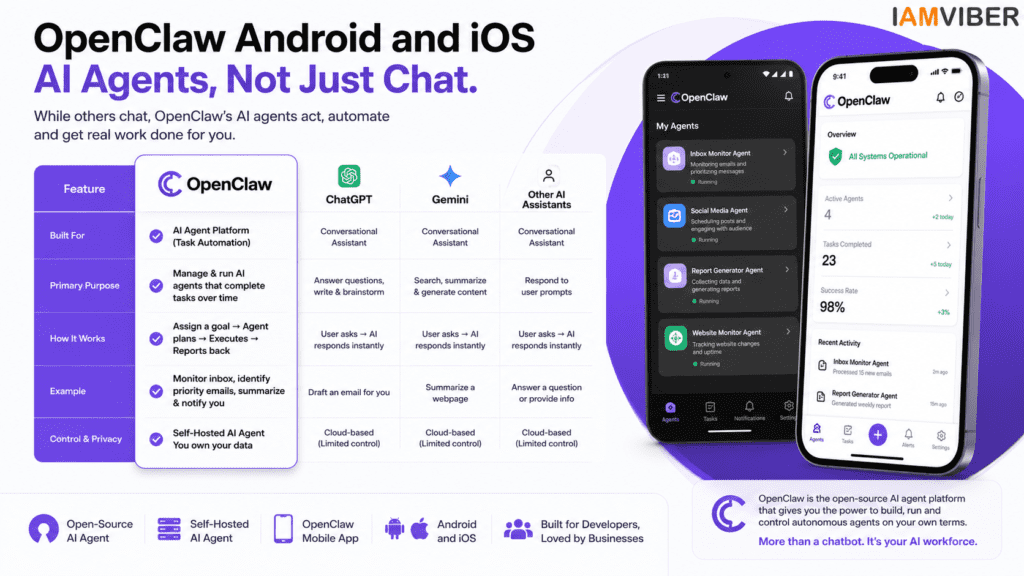
It’s easy to assume every AI product serves the same purpose, but that’s no longer true. The AI landscape is evolving into different categories, each built for specific tasks.
Platforms like ChatGPT, Gemini, and Claude are excellent conversational assistants. They help users write content, answer questions, brainstorm ideas, summarize information, and solve problems in real time.
OpenClaw, on the other hand, is designed for something different. Its primary goal is to manage AI agents that can perform tasks over time rather than respond to a single prompt. Think of it as the difference between asking someone for advice and assigning them a project to complete. For example:
- A chatbot can help you draft an email.
- An AI agent can monitor your inbox, identify priority messages, summarize them, and notify you when action is needed.
- This distinction is becoming increasingly important as businesses move beyond experimenting with AI and begin integrating it into everyday operations.
Who Should Consider Using OpenClaw?
OpenClaw isn’t built for everyone—and that’s perfectly fine. If your primary use case is asking questions, generating images, or writing social media captions, mainstream AI assistants will likely meet your needs.
OpenClaw shines when users want automation, flexibility, and control. Some of the people who may benefit the most include:
Developers
Developers can build custom AI workflows, connect APIs, automate coding tasks, and manage projects while keeping complete control over their infrastructure.
Startups
Early-stage companies often operate with small teams and limited resources. AI agents can take over repetitive work such as market monitoring, document processing, competitor tracking, and reporting, allowing teams to focus on growth.
Operations Teams
Operations professionals can automate recurring processes, track internal systems, monitor workflows, and receive alerts when something requires attention.
AI Enthusiasts
For people who enjoy experimenting with new technologies, OpenClaw offers an open platform to explore what autonomous AI agents can accomplish beyond simple conversations.
Real-World Use Cases
The true value of OpenClaw becomes clear when you look at practical applications. Imagine a founder who wants daily updates on competitors.
Instead of manually visiting multiple websites every morning, an AI agent could collect relevant information overnight, summarize key developments, and deliver a concise report before the workday begins.
A marketing team could automate trend monitoring across industry news, helping them identify emerging topics before competitors do.Developers could use AI agents to monitor repositories, flag deployment issues, or generate documentation automatically.
Customer support teams could organize incoming tickets, categorize requests, and prepare draft responses before a human reviews them. These examples show how AI agents can reduce repetitive work while keeping humans in control of final decisions.
The Advantages of an Open-Source Approach
One of OpenClaw’s biggest strengths is that it’s open source. Unlike many commercial AI platforms that operate within closed ecosystems, OpenClaw gives users the freedom to customize how the platform works. This approach offers several benefits:
- Greater transparency into how the system operates.
- Flexibility to integrate with different tools and services.
- Better control over sensitive business data.
- The ability to extend or modify features based on specific requirements.
- Reduced dependence on a single vendor.
- For organizations that prioritize privacy and customization, these advantages can outweigh the additional effort required to manage a self-hosted environment.
Challenges to Keep in Mind
While the mobile launch is exciting, it’s important to set realistic expectations. OpenClaw still targets a technical audience more than casual users.
Setting up a self-hosted Gateway requires some familiarity with servers, networking, or cloud infrastructure. Businesses without technical expertise may need additional support during the initial setup.
There’s also a learning curve. Building effective AI agents involves planning workflows, defining goals, and understanding how different tools interact.
As the ecosystem matures, we can expect setup processes to become simpler, making platforms like OpenClaw more accessible to a wider audience.
Why This Launch Matters for the AI Industry
The release of OpenClaw’s Android and iOS apps represents more than a feature update—it reflects the direction in which AI is heading.
We’re entering an era where AI won’t simply answer questions. It will actively manage workflows, coordinate systems, monitor events, and assist with ongoing responsibilities.
Mobile access is an important part of that evolution because work no longer happens from a single desk. Whether you’re traveling, attending meetings, or working remotely, staying connected to your AI agents from a smartphone makes autonomous systems far more practical.
As businesses continue adopting AI, platforms that combine automation with mobility are likely to play a larger role in daily operations.
Final Thoughts
Overall, OpenClaw Android and iOS is an important release for developers, startups, and businesses exploring AI agents.
OpenClaw’s mobile apps won’t replace traditional AI assistants, nor are they trying to. Instead, they strengthen a growing category of AI tools focused on autonomous work rather than conversation.
For developers, startups, and organizations already exploring AI agents, having native Android and iOS apps makes it easier to monitor workflows, manage tasks, and stay connected while away from a computer.
The requirement for a self-hosted Gateway means OpenClaw remains best suited for users who value flexibility, privacy, and customization over plug-and-play simplicity.
As AI continues to evolve, the biggest breakthroughs may not come from smarter chatbots alone, but from intelligent agents that quietly handle real work in the background. OpenClaw’s move to mobile is another sign that this future is arriving faster than many expected.
1. What is OpenClaw Android and iOS?
OpenClaw Android and iOS refers to the official mobile apps that allow users to monitor, manage, and interact with their AI agents directly from Android smartphones and iPhones.
2. Is OpenClaw Android and iOS free to use?
Yes, OpenClaw Android and iOS is available as an official mobile companion for the open-source platform. However, users need a self-hosted OpenClaw Gateway to access its full functionality.
3. How do I install OpenClaw Android and iOS?
You can install OpenClaw Android and iOS from the Google Play Store or Apple App Store. After installation, connect the app to your self-hosted OpenClaw Gateway to start managing AI agents.
4. What features does OpenClaw Android and iOS offer?
OpenClaw Android and iOS lets users monitor AI agents, receive real-time notifications, manage workflows, review completed tasks, and communicate with AI agents while on the go.
5. Does OpenClaw Android and iOS require a self-hosted Gateway?
Yes. OpenClaw Android and iOS is designed to work with a self-hosted OpenClaw Gateway, giving users greater privacy, security, and control over their AI workflows.
6. Who should use OpenClaw Android and iOS?
OpenClaw Android and iOS is ideal for developers, startups, businesses, researchers, and AI enthusiasts who want to manage autonomous AI agents from their mobile devices.
7. How is OpenClaw Android and iOS different from ChatGPT?
Unlike ChatGPT, OpenClaw Android and iOS focuses on managing autonomous AI agents that perform multi-step workflows instead of only responding to text prompts.
8. Why is OpenClaw Android and iOS important for the future of AI agents?
The launch of OpenClaw Android and iOS marks an important step toward mobile-first AI automation, making it easier for users to monitor, control, and manage AI agents anytime and anywhere.
Topics to follow: Current Affairs & Insights Tech Innovation GenZ entrepreneurship Collaborative Fashion GEO AI Agentic SME