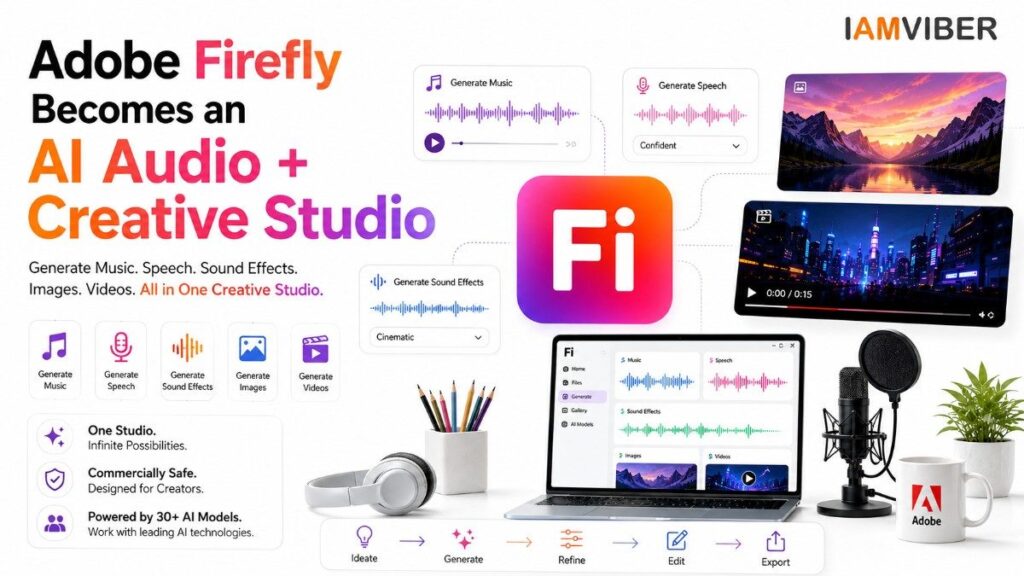
Adobe Firefly is becoming more than an AI image generator. Adobe has now expanded its creative AI studio with generally available tools for generating music, speech and sound effects, putting a broader audio-production workflow alongside image and video creation. The update, announced on August 20, 2026, is another sign that creative AI platforms are moving from single-purpose generators toward end-to-end production environments.
What Changed in Adobe Firefly?
The latest Adobe announcement focuses on audio. Adobe Firefly’s audio tools can generate commercially safe music, speech and sound effects, while its wider environment already supports image and video creation. Adobe also highlights a free AI Assistant designed to help users work through creative tasks using natural-language instructions.
That matters because the creative process rarely stops at an image or video clip. A social campaign may need a visual, background music, a voiceover, transition sounds and multiple edits. A short film needs dialogue, ambience, foley and music. A podcast needs speech, cleanup and supporting audio. By bringing these capabilities into one environment, Adobe is positioning Adobe Firefly as a more complete production workspace.
The bigger change is that Adobe Firefly is no longer being positioned simply as a collection of generative tools. It is increasingly being built around the complete creative workflow.
From Images to Full Creative Workflows
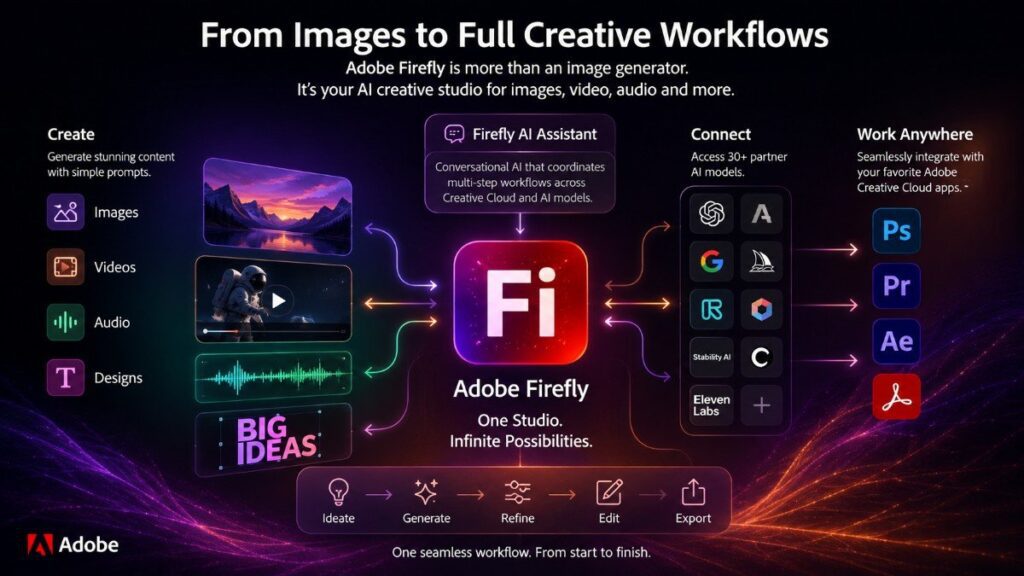
Adobe Firefly originally became widely known for generative image creation. Its role has expanded steadily into video, design and editing workflows. Adobe’s current product information describes Firefly as a place to create and edit images, audio and video, while also offering access to partner AI models.
The company’s larger strategy became clearer earlier in 2026, when Adobe introduced the Firefly AI Assistant. Adobe described the assistant as a conversational interface that can coordinate multi-step creative workflows across Creative Cloud applications and generative AI models. The company also said Firefly had access to more than 30 third-party AI models.
The new audio expansion fits naturally into that strategy. Instead of asking creators to jump between separate AI tools for visuals, voice and sound, Adobe is building a central creative environment where more of the production process can happen together.
Why AI Audio Is Becoming Important
Video generation gets much of the attention in generative AI, but audio is becoming equally important for usable content. A visually impressive video can still feel unfinished if the dialogue is unclear, the background is empty or the sound effects do not match the action.
Adobe Firefly’s audio capabilities target exactly that gap. Its sound-effect tools can generate custom effects from text prompts and can also use voice or audio references to guide the result. Adobe says its Firefly sound-effect generator is designed around licensed and public-domain training data and commercial-use considerations.
The practical benefit is speed. Instead of searching through a large sound library for a specific effect, a creator can describe the sound they need and generate a version that fits the scene. For marketing teams, filmmakers, podcasters and social creators, that could reduce small production bottlenecks that traditionally take time.
Music, Speech and Sound Effects in One Place
The most important part of the announcement is not any single generator. It is the combination. Adobe Firefly is increasingly built around that combined workflow.
AI music can help creators build background tracks for short videos and campaigns. AI speech can support narration, explainers and other voice-led content. AI sound effects can fill in environmental or action-based audio. When these tools sit beside image and video generation, the platform becomes much closer to a complete AI creative pipeline.
Adobe’s existing Firefly pages also describe speech generation with customizable voice, emotion, pacing and emphasis, including support for more than 20 languages. Adobe has continued adding controls for speech workflows, such as pauses and pronunciation adjustments.
For creators, those controls matter because production quality depends on editing, not just generation. A useful AI tool needs to let people shape timing, tone and delivery rather than simply produce a first draft.
The Bigger Battle: AI Creative Studios
The shift toward all-in-one creative platforms is bigger than Adobe Firefly.
Generative AI started with specialized tools: one platform for images, another for video, another for music and another for voices. That fragmentation created flexibility, but it also created friction. Creators had to move files between services, learn different interfaces and manage separate subscriptions and workflows.
Adobe is taking a different approach by making Adobe Firefly a hub. Its strategy combines Adobe’s own models with external models and Creative Cloud tools. Earlier updates brought models from companies including Google, Runway, ElevenLabs and others into the Firefly environment.
This does not mean every creator will stop using specialized tools. In fact, professional users may continue choosing the best model for each job. But a central workspace can make experimentation and production much easier.
What This Means for Marketers and Agencies
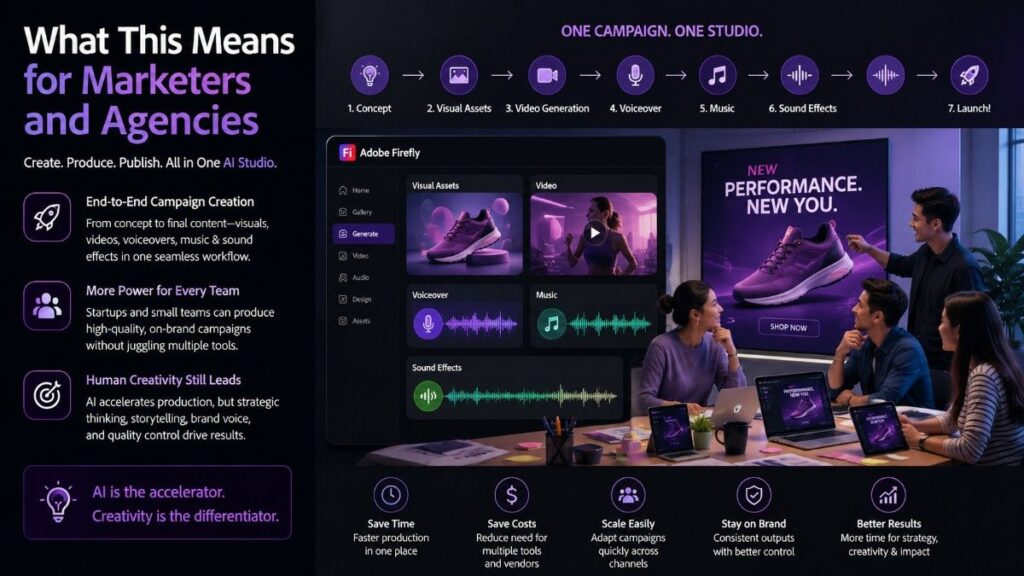
For marketing teams, the change could be particularly significant.
Consider a product launch. A team could start with a campaign concept, create visual assets, generate video material, produce a voiceover, add music and create supporting sound effects. The more of that workflow can happen in one environment, the less time the team spends moving assets between tools.
This could also make AI production more accessible to smaller teams. A startup without a large production department can potentially create more complete campaign assets without coordinating multiple specialist tools for every small requirement.
However, the technology does not remove the need for creative direction. Brand voice, storytelling, editing, legal review and quality control still matter. Generative AI can accelerate production, but it does not automatically make the output strategically good.
The Commercial-Safety Angle
Adobe is also emphasizing commercial safety. The company says Firefly’s own generative models are designed around licensed and public-domain content, and its audio announcement specifically describes the new audio tools as commercially safe.
That positioning is important for businesses. Copyright and training-data questions remain a major concern across generative AI. Enterprises are more likely to adopt creative AI when they have clearer information about how models are trained and what commercial-use protections are available.
Still, “commercially safe” should not be interpreted as a universal guarantee for every possible use case. Businesses should continue reviewing Adobe’s specific terms, model provenance and the rights associated with any third-party model or asset they use.
Will Adobe Firefly Replace Traditional Creative Tools?
Probably not — at least not in the way the headline might suggest.
The more realistic outcome is that AI becomes another layer inside professional creative workflows. Photoshop, Premiere and other Adobe tools remain important because professionals need detailed control, compositing, editing and finishing.
Adobe Firefly can become the orchestration and generation layer around those tools.
That distinction is important. The future of creative work may not be “AI versus professional software.” It may be professional software with AI deeply embedded into every stage of production.
What to Watch Next
The next important question is how far Adobe can take this integrated workflow.
Adobe Firefly has already moved beyond image generation into video, audio, conversational assistance and access to multiple AI models. The logical next step is deeper orchestration: creators describing an outcome and the system coordinating generation, editing, asset selection and refinement across a complete project.
That could make AI creative platforms less like collections of generators and more like digital production studios.
Adobe is not simply adding another audio generator. It is trying to make one environment useful across more of the creative production chain.
The Takeaway
Adobe Firefly’s latest update shows where generative AI is heading: from isolated content generation toward integrated creative production.
With music, speech and sound effects joining its existing image and video capabilities, Adobe Firefly is becoming a broader AI workspace for creators. The competitive advantage may ultimately come less from having one impressive model and more from making the entire workflow faster, easier and more controllable.
For creators, marketers and agencies, that could be the bigger shift to watch.
Frequently Asked Questions
1. What is Adobe Firefly?
Adobe Firefly is Adobe’s generative AI platform for creating and editing creative content, including images, videos, music, speech and sound effects. It is designed to bring multiple AI-powered creative workflows into one environment.
2. Can Adobe Firefly generate music?
Yes. Adobe Firefly can generate music from text prompts, allowing creators to create background tracks and other audio content for creative projects. The new music-generation capability is part of Adobe’s broader expansion into AI-powered audio creation.
3. Can Adobe Firefly generate voiceovers?
Yes. Adobe Firefly includes AI speech generation that can create voiceovers and spoken audio. Creators can control aspects such as voice, emotion, pacing and delivery depending on the available Firefly features.
4. Can Adobe Firefly generate sound effects?
Yes. Firefly can generate sound effects using text prompts and audio or voice references. This can help creators produce customized sounds for videos, animations, advertisements and other projects without searching through traditional sound libraries.
5. Is Adobe Firefly an AI audio generator?
Adobe Firefly now includes multiple AI audio-generation capabilities, including music, speech and sound effects. This makes it more than an image-generation platform and positions it as a broader AI creative studio.
6. Is Adobe Firefly commercially safe?
Adobe says its own Firefly generative AI models are designed with commercially safe use in mind and trained using licensed and public-domain content. However, creators and businesses should always review the applicable Adobe terms and the specific model or feature they are using.
7. Can Adobe Firefly create both images and videos?
Yes. Adobe Firefly supports generative image and video workflows in addition to its newer audio capabilities. This allows creators to work across multiple types of media within the same broader creative environment.
8. Is Adobe Firefly free to use?
Adobe offers Firefly access through different plans and usage limits, including free access with limited generative credits and paid plans with additional capabilities. Pricing and available features can change, so users should check Adobe’s current Firefly plans before subscribing.
Topics to follow on IAMVIEBR : Current Affairs & Insights Tech Innovation GenZ entrepreneurship Collaborative Fashion GEO SME